
Connect Claude to AdKit
Connect Claude to AdKit with one MCP connector and manage Meta, Google, TikTok, LinkedIn, Reddit, X, Microsoft, and ChatGPT Ads ads from a normal conversation: pull campaigns, draft changes, generate creatives, and research competitors.
There is one AdKit connector for every platform. You do not add a separate connector for Google or Meta. The same adkit_manage tool handles all of them once the ad account is connected in AdKit.
The steps are the same for Claude on the web, the Desktop app, and Claude Cowork.
- A paid Claude plan (Pro, Max, Team, or Enterprise). Custom connectors are not available on the free tier.
- An AdKit account with at least one ad account connected.
Setup (2 minutes)
- Add AdKit from the connector directory. Open the AdKit listing and click Connect. You can also find it in Claude under Customize → Connectors by searching for AdKit.
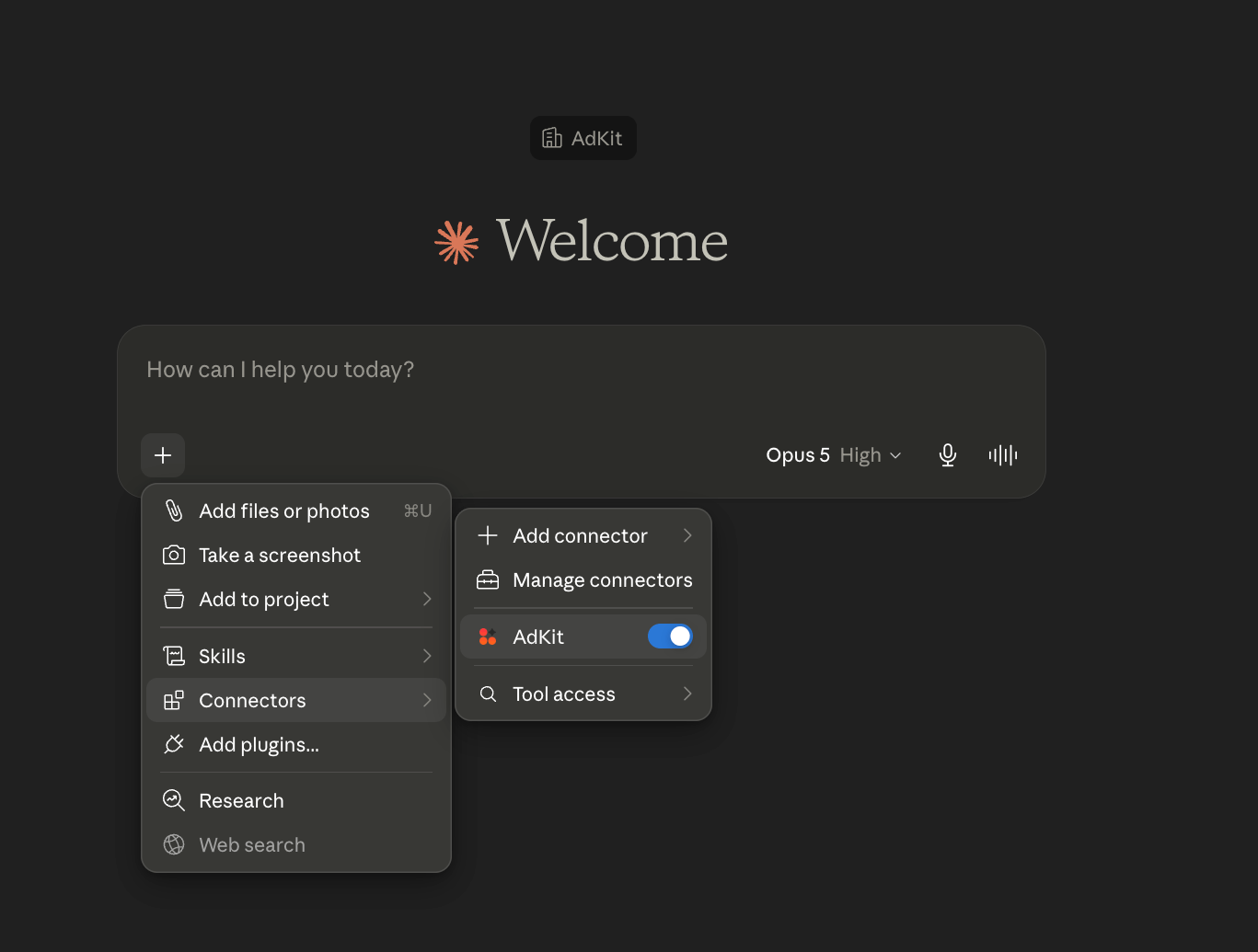
- Turn it on. In a conversation, click + → Connectors → turn AdKit on.
- Ask Claude to connect. Send this in a new chat:
Use the AdKit connector and run the AdKit checkin tool with agentId: "claude". Tell me if AdKit is connected and ready. If not, tell me how to connect it. - Done. When Claude reports it's connected, you're ready. Ask it to
list my ad accountsto confirm it can see them.
Add it manually instead
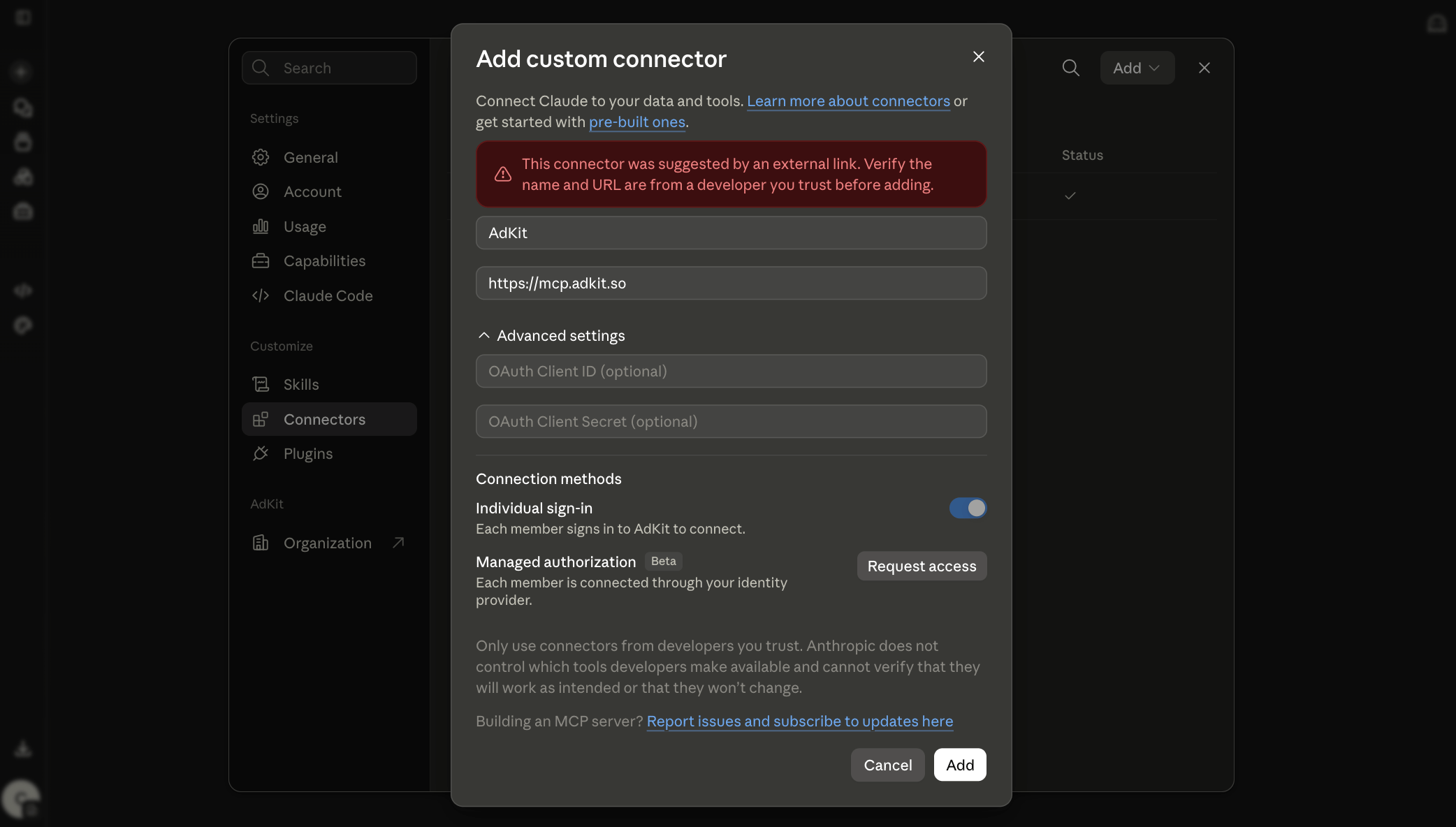
In Claude, go to Customize → Connectors → Add Connector. Name it AdKit and enter this URL:
https://mcp.adkit.so
Then enable it in a conversation: click + → Connectors → turn AdKit on.
Optional: allow file uploads
Only needed if you want to upload ad creatives through Claude. Add *.adkit.so to your allowed domains so Claude can upload files directly. On Team or Enterprise, an admin adds it in the organization capabilities settings instead. Full steps: Upload creative media.
Optional: install ad strategy skills
Teach Claude how to plan and run campaigns:
npx skills add adkit/ads-skills --skill '*'
What you can do
Once connected, Claude can:
- Manage campaigns: read live campaigns, draft budget, status, and targeting changes across Meta, Google, TikTok, LinkedIn, Reddit, X, Microsoft, and ChatGPT Ads.
- Create ads: generate images and copy in AdKit Studio, then push them as drafts.
- Research competitors: search the ad library (500k+ ads, 1000+ advertisers).
- Analyze: pull performance and spot what needs attention.
Nothing goes live automatically. Every change is created as a draft for you to review and publish.
Example prompts
Pull my active Meta campaigns and show me which ones are overspending this week.
Research my top 3 competitors' Facebook ads and summarize the angles they use.
Draft a new Google Search campaign for my SaaS, budget $30/day, and let me review before publishing.
Troubleshooting
AdKit shows as connected, but Claude says its tools aren't available, or the connection times out. Claude sometimes keeps a broken copy of AdKit's tool list, and clicking Reconnect doesn't clear it. A new chat won't help either. Do a full reset:
- In Claude, go to Settings → Connectors → AdKit and click Remove (not Disconnect).
- Quit the Claude desktop app completely (Cmd+Q on Mac). Closing the window isn't enough.
- Reopen Claude and add AdKit again from the connector directory, then start a new chat.
Your ad accounts and projects stay connected in AdKit, so nothing needs to be set up again on that side.
Claude doesn't see AdKit at all. Connectors are enabled per conversation: click + → Connectors and check AdKit is switched on. If it's not in the list, you installed it on a different workspace (personal vs. org), so add it in the one you're chatting in. On Team/Enterprise, an admin must add it first.
Claude only shows old or Meta-only tools (no adkit_manage).
Claude is showing a cached tool list from a previous connection. Remove the AdKit connector, add it again, and start a new chat. Also check the connector's tool permissions in Claude's settings: a tool category blocked there never reaches Claude.
In Cowork, tools are missing or vanish mid-session. Cowork sometimes loads only part of the tool list, and it has no screen for connector permissions. Start a new session so it fetches the full list again. If one tool is still missing, open Claude on the web and check the connector's tool permissions there: a category blocked on the web never reaches Cowork. If every AdKit tool is gone, do the full reset above.
Claude says a platform "isn't connected" even though it is.
There is no separate per-platform connector. Google and Meta share adkit_manage. Confirm the ad account is connected in AdKit (ask Claude to run adkit_status), then retry. If tools are missing, reconnect as above.
Another ads tool answers instead, or results mix up advertisers. Two ads connectors running side by side confuse Claude about which one to call. Disable the other one, remove any older AdKit connector that has a long URL, and start a new chat.
It worked before and stopped. The authorization expires after 90 days without use. Reset it: revoke the old connection under Devices & Keys, remove the connector in Claude, and run the setup above again.
Still stuck? Reach out and we'll help.