
 LinkedIn Ads MCP Meta Ads CLI Google Ads CLI Reddit Ads CLI TikTok Ads CLI X Ads CLI Microsoft Ads CLI


The safe LinkedIn Ads CLI for AI agents
Let your AI agents manage your LinkedIn Ads for you
Your agents build audiences, launch Sponsored Content, and pull reports through the AdKit CLI. Works with Claude Code, Codex, Cursor, and any terminal. Every change lands as a draft you approve before LinkedIn sees it.
 Claude
 OpenClaw
 ChatGPT
 Perplexity
 Claude Code
 Codex
Codex Cursor
 Grok
Grok Gemini CLI
 Hermes
 n8nMCP Server










"My agent analyzed my account using Adkit, found what to optimize, and drafted all the changes on its own. I only had to click 'Approve'. The first 30 minutes already saved me 8 hours of work."
LinkedIn Ad Manager makes simple work take an hour
- Build audiences by hand, adding job titles one at a time
- Babysit budgets that overspend or campaigns that die overnight
- Export CSVs and build the same client report every Monday
- ...or use other tools that have no guardrails and break your account
- 1. Ask your agentPlain English. It runs the CLI for you: audiences, campaigns, reports.
- 2. Review the draftEverything is a draft first. Preview campaigns, targeting, budgets.
- 3. Publish when readyNothing touches your live account until you explicitly approve.
"AdKit MCP has been extremely useful. I've been using my AI agent for a month now and last month I wanted to run an ad, I had to manually copy-paste csv, fix all the settings, spend hours. AdKit allows me to create and iterate on ads in a single prompt"
What your agents can do with the CLI
 Claude Code
Launch these 3 creatives as a Sponsored Content campaign targeting VPs of Sales at companies with 200+ employees. $100/day, lead generation.
Built it as a draft: 1 campaign, 3 ads, VP of Sales targeting at $100/day.
[ Launch Campaigns ]
Launch LinkedIn Ads from one command
Attach your creatives and tell your agent who to reach. It builds the campaign, targeting, and budget as a draft, and nothing goes live until you approve it.
 Claude Code
Write my weekly LinkedIn report for the client — spend, leads, what's working.
Here's the week, ready to send:
Weekly LinkedIn Ads Report
Jun 23 – Jun 29
Spend
$4.2k
+8%
Leads
52
+15%
CPL
$81
-6%
Cost per lead down 6% week over week
Best audience: VPs of Sales at $61 per lead
[ Reporting ]
Create reports you can share
Ask your agent for the week and it pulls spend, leads, and cost per lead across every campaign, then writes the summary in plain English. No CSV export, no pivot table. Reporting is read-only, so nothing about your live account changes.
 Claude Code
Break down my Sponsored Content campaign by job title. Which titles are wasting spend?
Two titles are clicking but not converting. Here's the breakdown:
Exclude 2 job titles
Drafted — approve to apply
[ Cut Waste ]
Find the job titles burning budget
Your agent ranks your job titles by cost per lead and flags the ones producing nothing. Approve the exclusion and it drafts the targeting change.
 Claude Code
Build me an audience: marketing managers and up, at SaaS companies with 50–500 people.
Assembled it with every seniority tier:
Job titles
Company
Exclude
[ Build Audiences ]
Build your target audience in seconds
Ad Manager makes you add job titles one at a time. Your agent builds the whole audience in one go and shows the estimated reach before you spend a dollar.
Claude CodePause any ad group over $120 CPL, and relaunch the 'Enterprise Q3' campaign — it stopped delivering yesterday.
Two moves drafted for approval:
Pause 'Demand Gen — Broad' ad group
CPL hit $148, above your $120 cap
Relaunch 'Enterprise Q3' campaign
Lifetime budget exhausted — reset and resume delivery
[ Budget Control ]
Keep your ad spend under control
LinkedIn can overspend your daily budget by up to 50%, and campaigns can switch themselves off overnight. Your agent watches both and drafts the pause or the relaunch for your approval.
"Now I can use my AI agent for monitoring competitors, creating static ads, publishing them, and analyzing their performance. This has 10x'd my capabilities to iterate on ads."

Flo Pariset
Founder of Notis AI
Connect, draft, and publish in three steps
Connect your agent
Ask your agent to connect, and it links your LinkedIn ad account through AdKit. Works with Claude Code, Codex, Cursor, and any terminal. Under 2 minutes.
Draft in plain English
Ask for a campaign, an audience, an exclusion, or a report. Your agent runs the CLI and everything writable lands as a draft in AdKit.
Review and publish
Open the dashboard, check the targeting and budgets, and approve. Only then does anything reach LinkedIn.
"I'm not a technical person, but I was able to get AdKit set up really quickly! I use it for competitor research and managing Meta campaigns, and it's made the whole process much much faster. I connected it to Giga, my AI co-pilot in Slack, and was able to launch a campaign directly from there. Super!"
Works with any AI agent or terminal
Any CLI or MCP-compatible client. One config line, connected in under 2 minutes.
Your CLI connects to a full ads platform
Research
Find what's working right now
Browse 500k+ ads or import your competitors. Filter by vertical so you see businesses like yours.
- Competitors tracked across Meta, Google, and LinkedIn automatically
- See which ads are evergreens vs. tests your competitors already killed
- Weekly digest in your inbox. No more scrolling ad libraries.
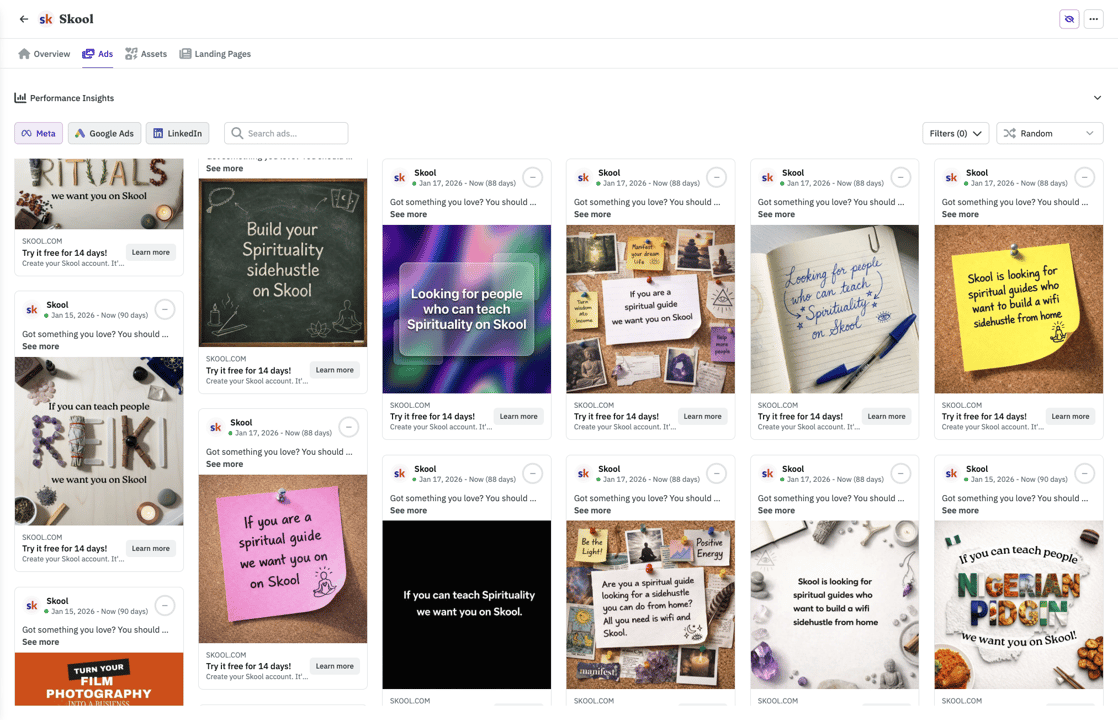
With your agent
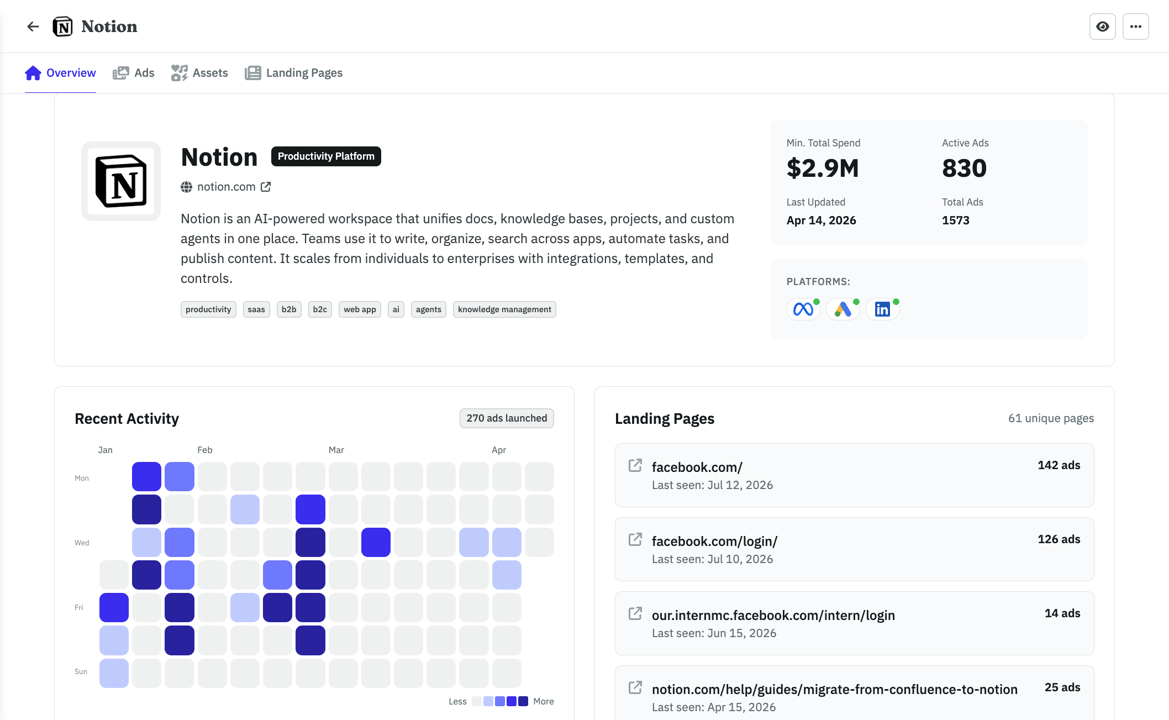
ClaudeWhat's the ad Notion has been running the longest?
Their Postit style ad has been live 142 days, it points to their top landing page (126 ads running to it). Want me to save the creative and LP to your swipe file?
Built by someone who actually runs ads

Hi there 👋 I'm Nico, the founder of AdKit 😄
Before building startups, I was a media buyer. I managed over $1,000,000 in Ads, sold two startups grown with ads, and helped 1,000+ makers learn Meta Ads through my online guides.
I love ads but... it involves a lot of repetitive, boring work 😩 And I hated every second of it. So I built AdKit to fix that.
To let me and other marketers focus on the fun parts: the strategy, the thinking, the creativity. And not have to waste my time clicking around in buggy interfaces.
It's the app I always dreamed of, and I hope you'll like it too 😀
You're probably wondering...
Every change is a draft by default. Your CLI commands create campaigns, targeting, and ads in AdKit's dashboard. Nothing touches your LinkedIn account until you approve it.
You could. But LinkedIn's Marketing API has complex campaign hierarchy, strict policy enforcement, and frequent breaking changes. AdKit handles all of that. You get a CLI, it handles the API.
No. AdKit handles auth. One command to connect your LinkedIn ad account, no token setup, no OAuth dance.
People like you love AdKit:
Founders & Solopreneurs
You're growing a product and don't have the budget for an agency. You want to run ads yourself without spending your week in Ad Managers UI.
Agencies & Media buyers
You run multiple ad accounts and want a way to manage them faster. 10 accounts = 10x the same work, and every hour wasted in ad managers is time you'll never get back.
Growth Marketers
You already do most of your work with AI agents. Ads should work the same way, not force you into a separate tool with its own learning curve.
Brand Managers
You need to easily keep track of what competitors are doing and get ideas. AdKit lets you track your competitors across platforms and search 500k+.
Stop losing hours to LinkedIn Ad Manager
- 45mAudience builds
Job titles, seniority tiers, company sizes. One ask instead of forty clicks.
- 1hClient reporting
Spend, leads, and cost per lead across every campaign, written up and ready to send.
- 30mWaste sweeps
Rank job titles by cost per lead and draft the exclusions in one pass.
saved every year
(2-3h/week x 52 weeks)
That's a client report and an audience build off your plate, every single week.
Your target audience is one ask away, rebuilt fresh for every campaign.
The Monday client update goes from an hour of CSV wrangling to one sentence.
Everything your agent runs lands as a draft for your approval, never straight to live.
AdKit vs custom scripts vs the ad manager
  | Custom API scripts | Ad manager UIs | |
|---|---|---|---|
| Platforms | Meta, Google, TikTok, LinkedIn, X, and Reddit from one CLI. | One integration per platform, each built and maintained by you. | Log into each ad manager separately. |
| Safety | Changes are saved as drafts. Nothing goes live until you approve. | Scripts write straight to your live account. Bugs go live too. | You click the buttons, so mistakes are yours to catch. |
| Setup | Connect your ad accounts and let your agent run the CLI in minutes. | API access requests, credentials, and weeks of platform docs. | No setup needed. You already have your ad manager logins. |
| Competitor research | Ask your agent to pull competitor ads from a library of 500k+ creatives. | Not available. | Open each platform's ad library and search manually. |
| Reporting | Ask your agent how your campaigns are doing across all platforms. | Whatever you build yourself, one platform at a time. | Log into each platform and check the dashboards yourself. |
"I look up a competitor, I check that they run ads across LinkedIn, Google and Meta, so I get a good sense of what works or what channel I should focus on."
Compatible with:












Cheaper than the hour it saves you
Single Project
Every AdKit tool (ads library, AI studio, and MCP) for one brand.
$49
per month
Everything you need:
- Multi-platform Ad Library
- Competitor Tracking
- Activity Alerts
- AI Ads Generator & Cloner
- Swipe File
- 1 Project
- 1 ad account on each platform
- MCP Access for AI Agentsnew
Multiple Projects
Unlimited brands, ad accounts, and creative analytics (soon).
$97
per month
Everything you need:
- Multi-platform Ad Library
- Competitor Tracking
- Activity Alerts
- AI Ads Generator & Cloner
- Swipe File
- Unlimited Projects
- Unlimited ad accounts
- MCP Access for AI Agentsnew
- Creative Analyticssoon
"Loving AdKit! It works flawlessly with my Claude Code setup, and the value is fantastic. I came from another tool and not only does it save me money, there's basically no trade-off for what I need, and the support is 10/10. Definitely recommend!"

Mitch Hills
CEO at Mastered Marketing
Common questions
Put your agents to work on LinkedIn Ads
Build the audience, launch the campaign, send the report, all through your agent. Every change held as a draft for your approval.
Prefer MCP? Same product, chat interface